Cable TV Founders: Creators of the Largest Cable Companies

The first person who can be considered one of the cable TV founders is John Walson. He invented cable television in 1948 when he mounted an antenna on a mountaintop in Pennsylvania and connected it via cables and boosters to the televisions in his store so they could receive stations in Philadelphia without interference. However, the technology behind transferring video via cables was created in 1885 by Henry Sutton. Sutton tried to submit pictures of the Melbourne Cup through his Telephane (considered the forerunner to television), but the telegraph wires he was using to transmit the data did not have the bandwidth needed to transfer a true picture.

comcast

AT&T and Verizon

AT&T’s founder is the most famous person on this list. Alexander Graham Bell, who invented the telephone, first created the Bell Telephone Company in 1877. The American Telephone and Telegraph Company (AT&T) was created in 1885 as a subsidiary of the American Bell Telephone Company. In 1894, Alexander Graham Bell’s second telephone patent expired, which allowed competition to enter the cable business. Over 6,000 companies joined the cable business over the next 10 years.

In 1974, the government started an antitrust against AT&T, stating it had a monopoly. It was resolved in 1982, and AT&T was split into several parts in 1984. Bell Atlantic took several of these companies and operated in several states on the East coast. In 2000, Bell Atlantic merged with GTE and formed Verizon.

Cox Communications

James Cox bought the Dayton Daily News in 1898, served two terms as the governor of Ohio, and ran for president of the United States in 1920. He bought several other newspapers, and together they formed Cox Enterprises. James Cox died in 1957, but his legacy continued. In 1962, Cox Enterprises started purchasing several cable systems. This cable network broke off as a subsidiary of Cox Enterprises in 1964, and became Cox Broadcasting Corporation. Eventually, Cox Broadcasting Corporation became Cox Communications, as it is called today.

Time Warner Cable

Time Warner Cable comes from a merger between Warner Bros. and Time Inc. Steve Ross started his career in the rent-a-car business. From there he purchased parking lots and an office-cleaning company. These businesses were combined to create Kinney National Services. In 1966, he purchased a talent agency, and in 1969 he paid $400 million for Warner Bros. Two years later the name was changed to Warner Communications. In 1989, Warner Communications and Time merged, creating the largest media and entertainment company at the time.

Comcast

Ralph J. Roberts purchased a small 1,200-subscriber cable TV operator for $500,000. Although Roberts is considered the founder, he had two partners, Daniel Aaron and Julian Brodsky, who helped with the initial purchase. In 1969, it was incorporated as Comcast Corporation. Prior to becoming a communications giant, Roberts was President and CEO of a clothing store.

Most of these cable TV founders started with practically nothing and worked their way up in the industry. Now Comcast is the leading cable company in the United States with over 23 million subscribers. Time Warner Cable is number two with 12 million, Cox Communications sits in the third spot with 4.6 million, and Verizon and AT&T are in the fourth and fifth places with 4.59 and 4.3 million, respectively.

About the Authors

Tips for Saving Battery Life on iPhone

We’ve all had that moment when we find ourselves somewhere with no power outlets to be found, and with less than 20 percent of battery life left on our iPhone. Sorry, beautiful plate of cheese fries you were planning to show off on Instagram, today is not your day. To prevent that travesty from occurring again, here are 10 tips for saving battery life on the iPhone, with an emphasis on applications in iOS 7:

iPhonebattery

10 Tips for Saving Battery Life on iPhone

  • Background App Updates
    We agree it’s awesome not having to check which apps need to be updated on your iPhone, thanks to Background App Refresh which allows the automatic updates of your apps. However, this can really take a toll on your battery life. If you prefer to turn this feature off, to disable the feature go to Settings > General > Background App Refresh and turn off the function or choose and pick the apps you don’t want to update automatically.
  • AirDrop
    Airdrop allows you to beam/send files to other iOS devices. You don’t need to have this feature on all the time. In order to save your precious battery life, you can turn off this feature by going to the Control Center and selecting the option to Disable AirDrop.
  • Lower Screen Brightness
    No matter what iOS device you’ve had, screen brightness is a battery killer. If your iPhone’s screen is so bright, you gotta wear shades, consider taking it down a few notches. Go to Settings > Wallpapers and Brightness, then disable Auto-Brightness. You can then lower decrease the brightness of your screen manually.
  • WiFi Search
    If you don’t need to be on the constant search for a WiFi connection, turning off the WiFi Search function will save some battery life. Go to the Control Center and toggle off the WiFi button.
  • Location Services
    Perhaps you find there is no need to have location settings enabled for all your apps. In that case, you can turn them off by going to Settings > Privacy > Location Services and toggling off the apps you don’t need connected to your phone’s GPS.
  • Spotlight
    This internal search function can come in handy, but it can also put in a serious dent in your battery life while it’s indexing the contents of your iPhone. Go to Settings > Spotlight Search and take a look at any items you don’t use and remove them from Spotlight’s search.
  • Parallax
    You like animations? You like the new dizzying features of iOS 7 like moving wallpapers and such? If not, then you can save your battery life by turning off Apple’s Parrallax feature. Go to Settings > General > Accessibility and select Reduce Motion to On.
  • Email Notifications — So Fetch
    Make “fetch” happen and disable the Push option on your emails! Push email downloads emails when they arrive, meaning your iPhone is constantly checking for new email and using up your battery. If you aren’t in a rush to get new emails the moment they arrive, you can schedule when to check for new email. Go to Settings > Mail, Contacts, Calendar and go to Fetch New Data. Disable the Push option. Then set the Fetch Schedule to every 15 minutes.
  • Push Notifications for Apps
    You don’t really need a push notification for all your apps, do you? Give your battery a rest by turning off some of your notifications. Go to Settings > Notification Center and scroll down to the Include section, and turn off some of those pesky notifications.
  • Siri’s Raise to Speak
    The Raise to Speak function does exactly that, allows you to raise your iPhone to speak into it and talk to Siri. This also takes up some battery power, so you can disable this feature by going to Settings > General > Siri > Raise to Speak and toggling the feature off.

Follow these tips for saving battery life on the iPhone, and you won’t be caught with a dying battery when you need it most!

Photo credit: Flickr

About the Authors

The Most Popular Internet Providers

The most popular Internet providers are those with the largest service areas, fastest connection speeds, and the best customer service. Customer service, as everyone knows, is a hit-and-miss game depending on the specific person you reach when you call. However, something to look for is the different ways to contact customer service.

verizon

Comcast

Comcast is the largest cable provider in the United States, connecting more than 17 million users to the Internet daily. They have the second fastest connection speed, reaching upwards of 105 Mbps, and they received some of the highest scores for customer service from TopTenReviews. They also have a top-of-the-line extras package including free email accounts, data storage, and Internet security.

AT&T

AT&T’s service area is equal to Comcast’s, but it only provides 24 Mbps connection speeds… which, unless you are a hardcore gamer or a business that requires fast data speeds, will suffice. Out of all the top-ten providers, AT&T has the lowest subscription price. It is also one of the few companies that offers dial-up, DSL, and fiber optic connections through its U-Verse service. It offers 10 email accounts, but that is usually not a big draw, since most people are content with using their free MSN, Yahoo!, or Google email accounts.

Cox Communications

Cox services a smaller number of customers, but it only covers 16 states. It also gives its customers 10 free email accounts and Internet security. Cox is one of the highest rated in customer service, and it offers customers speeds up to 50 Mbps.

Time Warner Cable

Time Warner Cable offers its 14 million customers up to 50 Mbps in upload speed. It has a solid customer base in the 39 states it reaches.

Verizon

Verizon has one of the smallest service areas of the major cable companies. However, it offers a whopping 300 Mbps connection speed (in limited areas), 10 free email accounts, and storage. Its customer service is on par with the other major companies, and it offers dial-up, DSL, and fiber optic connections.

However, the most popular Internet providers may not be the best for your situation. In most cases, more than one provider can service a customer’s needs. Find out which ones are in your area. Ask neighbors or friends if they have had any issues, and avoid long contracts. Give yourself time to connect to a service and decide if it is right for you.

Photo credit: Flickr

About the Authors

Streaming Videos: Minimum Internet Speed Depends on Quality

Streaming video is probably a major reason you decided to pay extra for a high-speed Internet connection. But what is the minimum Internet speed for watching videos on a tablet, PC, or even a big-screen TV using a Roku, PS4, or Xbox One? The ultimate answer depends on the video quality.

Video_Aware_Wireless_Networking_VAWN_demonstrated_on_tablets

Internet Connection Speed Recommendations from Netflix

As one of the leading streaming-video services in the industry, Netflix definitely knows what the minimum Internet speed is for online viewing without lag. Their recommendations reveal that video quality is an important factor.

Netflix requires at least a 0.5 megabits per second (Mbps) connection at the bare minimum, and they recommend a 1.5 Mbps to even stream video at the lowest quality. You should expect essentially home video-level entertainment at this broadband speed.

The company recommends at least 3.0 Mbps for DVD-quality video streaming, and they bump that number up to 5.0 Mbps for HD-quality performance. Netflix claims that TV shows originally encoded in HD will play in 720p resolution or better provided that 5.0 Mbps bandwidth threshold is met.

Netflix even supports higher resolutions when available, but their bandwidth recommendations increase to 7.0 Mbps for Netflix Super HD format. For the few of you that enjoy 3D television content, the Internet speed recommendation is 12.0 Mbps. Remember that these are recommendations: for example, it is possible to occasionally stream HD video at 3.0 Mbps, but expect pixelation and lag, especially if there is heavy Internet traffic.

Shared WiFi Connections Lead to Degraded Streaming Performance

Remember, if you share your Internet connection with other users on the same WiFi connection, you are all fighting over one piece of bandwidth, so your actual streaming performance can vary from these numbers. It is probably a good idea to run a quick Internet speed test before streaming high-quality video. Ultimately, the minimum Internet speed to stream video on a tablet or any other device depends on the video quality, so make sure your provider is keeping up their end of the bandwidth bargain.

Photo credit: Wikimedia Commons

About the Authors

WiFi vs Wired Connection: Strengths and Weaknesses of Both

When setting up a home network, it helps to know the issues concerning a WiFi vs Wired connection. What are the strengths and weaknesses of both? Is it worth the extra cost and effort to set up a wired connection for every computer in the house?

Yagi-Uda_antenna_for_Wi-Fi_on_Router

Mobile Devices Really Need a WiFi Connection

Ease of connectivity is the major advantage WiFi connections hold over their wired brethren. In this age of mobile devices, connecting to a wireless router is effectively the only option for Internet access for a smartphone and tablet computer. And the wireless trend is also reaching some notebook computers, like the MacBook Air, which doesn’t even a have an Ethernet port for connecting to a wired network.

Advancements in wireless technology also provide better speeds that now compete with what Ethernet offers over a wired connection. The newer 802.11ac standard theoretically reaches speeds up to 1,000 Mbps, matching many Ethernet ports.

Wired Offers Some Advantages Over a Wireless Connection

Still, despite the relative convenience of a WiFi network, connecting to a wired network using a fast Ethernet port provides the most secure signal, with no radio interference or the potential of someone hacking a wireless router. Radio interference, while primarily a minor problem, does impact the speed of a connection and limits its range somewhat, especially in a larger house.

Of course, there is the extra cost involved in the cabling, ports, and effort needed to properly wire up an Ethernet network in a house. So that is an issue that must be considered when deciding between Ethernet and WiFi.

The Decision Between a WiFi vs Wired Connection

Ultimately, it depends on whether the speed and security of an Ethernet network is worth the extra setup cost as well as the inability for any mobile devices to connect. The growing number of smartphones and tablet computers in the home mean a WiFi network makes the most sense for the majority of consumers.

Photo credit: Wikimedia Commons

About the Authors

The Internet Bandwidth Calculator: Why Your Use Matters

How much you download from the Internet varies from month to month, but is fairly consistent over the long term. This total amount of bandwidth may seem like an also-ran when compared to the speed of your connection (remember to regularly check your bandwidth performance with an Internet speed test), or its price, but knowing how much data you transmit and receive can help determine which providers offer the best deals, and which want to charge too much per megabyte; to estimate this data use, you need an Internet bandwidth calculator.

upload_download_sign

The Vanishing Buffet

Water, electricity, and natural gas are all metered based on actual consumption — the more you use per month, the higher your bill. Internet, however, has typically been an all-you-can-eat affair, allowing users to download and upload as much as they want for a fixed monthly fee. This model posed no problems for providers in the days of dial-up modems and first-generation affordable desktops, but advances in connection speed coupled with the rise of mobile devices has led to massive consumption with an expectation of unlimited use. Smartphone and tablet providers were quick to impose limits on mobile data, which consumers had no choice but to accept in an emerging market. Wired Internet providers, however, have been trying to cap the amount of data per user for years. Some companies have tried opt-in plans that come with lower monthly rates, while others give users willing to pay for higher speed packages larger data caps. Others are simply mandating caps and assessing fees for any overage; in other words, if you plan allows only 10 gigabytes per month and you download 11, expect to pay a premium.

A Quick Test with an Internet bandwidth calculator

To avoid paying more than you should for data, you need to determine how much you use in a typical month. One way to find this number is by recording the size of every file you download or send — this includes emails, emails with attachments, images, videos, songs, and even the data transferred while web surfing. Although possible, most users don’t have time for this kind of detailed study and instead turn to a free Internet bandwidth calculator. Many sites offer this service, allowing you to estimate the number, type, and size of files you send and receive during the month to produce an average result. Some will give an estimated total use in gigabytes, while others will suggest how fast your connection should be to support your needs. If your concern is hitting a provider’s data ceiling, look for a calculator that returns results in amount of data downloaded; faster transfer rates do nothing to lower the cost of data overages.

Not all providers have switched over to hard caps, especially on home network or small business connections, but if you’re not sure always call and ask exactly what your plan covers and how much per gigabyte you’ll be charged for going over. Although a bandwidth calculator can’t give an exact reading on how much you’ve downloaded — or will in the coming months — using this tool is a good way to determine if you need to scale back on your downloads or find a provider that doesn’t limit your use.

About the Authors

How to Run a Speed Test for Spectrum Internet

We’ve all worked behind slow computer screens waiting for a website to load, getting more frustrated with every passing second. Running a bandwidth speed test can provide insight into how fast your internet connection is and whether your internet provider is meeting your needs.

Charter Communications is one of America’s largest TV, internet, and voice providers. Charter acquired Time Warner Cable and Bright House Networks to form the Spectrum brand, which now serves more than 29 million customers throughout 41 states, with 27 million being broadband internet customers. However, no two internet connections are the same, which means your neighbor might have a lightning-fast Spectrum internet connection while your connection barely loads your browser’s homepage.

Running a Spectrum speed test can help you understand whether your internet service provider (ISP) is causing bogged down speeds or if you’re experiencing another computer issue.  Throughout this guide, we’ll run you through how to conduct a Spectrum speed test, understand your speed test results, and any additional questions regarding your Spectrum web connection.

What is an internet speed test?

An internet speed test measures your internet’s broadband connection parameters, which includes your internet’s download and upload speeds in megabits per second (Mbps). When an internet speed test is run, a small file from your ISP’s server is sent to your computer. This file is then downloaded onto your computer, then reuploaded and sent back to the server. Your internet speed is the time it takes to download and upload this file.

Internet speed tests measure a number of key metrics, including:

  • Upload speed
  • Download speed
  • Bandwidth
  • Ping
  • Latency
  • Jitter

Depending on the internet speed test you choose, you might not get readings for each of these metrics. For most internet speed tests, you will find that upload and download speeds, along with bandwidth, are standard measurements.

How to run a Spectrum internet speed test

Running a Spectrum internet speed test is easy. Follow the steps below to get started:
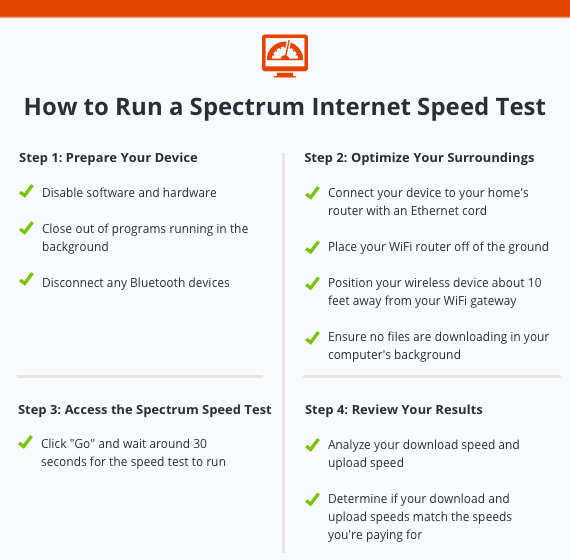
Step 1: Prepare your device

Before running your Spectrum WiFi speed test, you want to ensure your web-enabled device is fully optimized. To prepare your device, you don’t want other devices to get in your way.

Disconnect all devices that are connected to the internet, besides the device you’re using for the speed test. Multiple devices connected to your internet can lead to an inaccurate reading. This means:

  • Disabling software, such as anti-virus software and multiple browser tabs, that slow down internet speed
  • Disabling hardware, such as intrusion prevention systems and firewalls, that can result in a slow reading
  • Disconnecting Bluetooth devices, such as wireless phones, video devices, and baby monitors

Once you’ve disconnected all other devices that are using your internet connection, you’ll be ready to move onto step two.

Step 2: Optimize your surroundings

The environment your web-enabled device is in can also alter the readings of your Spectrum internet speed test. To prepare your surroundings, consider these tips:

  • Connect your web-enabled device with your home’s router with an Ethernet cord, if possible. A direct connection can help provide faster speeds compared to a wireless connection.
  • Place your WiFi router off of the ground, such as on a desk or table, and away from any electronic devices that can disrupt the connection, such as cordless phones and other devices connected via WiFi.
  • Position your wireless device about 10 feet away from your WiFi gateway if you can’t use an ethernet cord.
  • Go through your computer’s Task Manager or Activity Monitor to ensure no files are downloading in your computer’s background.

With your surroundings fully optimized, you’ll be ready to run your Spectrum speed test.

Step 3: Access the Spectrum Speed Test

To conduct your Spectrum speed test, start by clicking, “Go.” From there, your computer, laptop, or other web-enabled device will begin running the speed test. The speed test should take no longer than 30 seconds, and once complete, you’ll see your computer’s download speed and upload speed in Mbps.

Step 4: Review your results

Once your Spectrum speed test results come in, it’s time to begin reviewing them. Your results will show you your download speed and upload speed in Mbps. If you use Bandwidth Place’s internet speed test, you’ll also get a Ping reading in milliseconds (Ms). Other speed tests will provide a jitter reading or latency reading as well. In the next section, we’ll go over these internet speed test terms, so you can fully understand your speed test results.

The speeds from your test should resemble the speeds your Spectrum service plan states. If you notice that your internet speed doesn’t reflect the speed your Spectrum service plan promises, you can log into Spectrum’s user portal to review your subscription, plan, and contract.

Once logged in, you’ll be able to see what internet speed you’re paying for and find contact information for Spectrum’s service representatives to remediate any issues. However, it’s important to remember internet speed tests provide an approximate speed, not exact, which is why your results might not be completely accurate.

It’s also important to note that your download speed will usually be faster than your upload speed. This is because most computers are designed to download files faster than uploading files. Your computer performs a lot more downloads compared to uploads, such as loading a webpage, downloading a document for work, or playing a video game with heavy graphics, which is why ISPs prioritize download speeds to optimize service.

Spectrum internet download speeds

Spectrum offers three internet plans to choose from, with each tier having a different download speed.

  • Standard Internet download speed: 60-200 Mbps
  • Ultra Internet download speed: 300-400 Mbps
  • Gig Internet download speed: 940 Mbps

Spectrum’s Standard Internet package should meet your online needs if you’re an everyday internet user who uses social media, sends emails, and browses the internet. You’ll need to start moving up plans depending on your activity use.

For example, the Ultra Internet package might work well for online gamers, users who stream HD videos, and small businesses. The Gig Internet package might work well for small or larger businesses that have a team of employees using the internet at any given time.

Spectrum internet upload speeds

Spectrum’s three internet plans also come with their own upload speeds. Spectrum’s internet uploads speeds for each plan go as follows:

  • Standard Internet upload speed: 10 Mbps
  • Ultra Internet upload speed: 20 Mbps
  • Gig Internet upload speed: 35 Mbps

Similar to Spectrum’s download speeds, the internet package you choose depends on the type of online activities you perform. Larger families or small businesses may need Spectrum’s Ultra Internet or Gig Internet package, while single users or smaller families will benefit from Spectrum’s Standard Internet package.

A Spectrum speed test is a great way to determine whether your internet is performing the way it should. If you’re experiencing further issues, contact a Spectrum customer service representative.

Internet speed test terms

Running an internet speed test doesn’t require prior knowledge. All you have to do is click the start button, and your speed test will begin running. The tricky part is understanding your speed test results, as it may contain words and industry jargon you’re unfamiliar with. Below are some common speed test terms you may encounter.

Download speed

Download speed is the time it takes for your computer to retrieve data from your ISP’s server, and is measured in Mbps.

In most cases, bandwidth connections offer faster download speeds than upload speeds because a majority of online activity requires faster download speeds. Faster download speeds come in handy for a variety of online activities, such as playing video games, streaming videos, and loading webpages.

Upload speed

Upload speed is the time it takes for your computer to send back data to your ISP’s server, and is measured in Mbps. While a bulk of online activity requires you to download files, you regularly perform uploads, such as sending emails, posting a picture on social media, and video-chatting with friends and family. Activities like these require fast upload speeds.

Mbps

Megabits per second (Mbps) is a unit of measurement for internet speed. It measures the bandwidth capacity of an internet connection and determines the amount of data that can be transferred each second. The higher your Mbps reads on your speed test, the faster your internet connection is, which means you can download and upload files in a shorter amount of time.

Ping

Ping is the response time between messages sent between computers. When you send out a request, such as kicking a soccer ball into a goal on a video game, you wait for a response, such as a goalie blocking the shot. The time it takes for a response to happen is your ping rate—the lower the ping rate, the better. Ping is measured in milliseconds (ms) and is imperative for time-sensitive online programs, such as video games.

Latency

Latency is similar to ping, as it measures the time it takes in milliseconds (ms) for a response to be sent to and from your ISP’s server. While ping measures the speed at which this response takes, latency looks at the quality of the response. Higher latency means increased lag time, which means the lower the number, the better.

Bandwidth

Bandwidth is the maximum rate at which data can transfer through an internet connection within a set amount of time. While you may confuse bandwidth with internet speed, it actually refers to the volume of data that can be sent, rather than the speed at which the data is sent. Bandwidth is typically expressed in Mbps.

What should my Spectrum internet speed be?

The Federal Communications Commission sets broadband benchmark rates that ISPs should meet. The broadband benchmark rate for download speeds is 25 Mbps, while the benchmark rate for upload speed is 3 Mbps.

These benchmarks were set to ensure Americans have access to advanced broadband with timely speeds. However, over half of rural Americans lack access to 25 Mbps/3 Mbps speeds. So, if your internet speeds aren’t reaching these numbers, the FCC doesn’t count it as broadband service.

Service providers, including Spectrum, are working to bring broadband service to more people across the country so that they can enjoy fast internet speeds. Timely internet speeds are important for a variety of reasons, such as:

  • Accessing HD videos
  • Streaming videos online
  • Downloading graphics
  • Playing video games
  • Retrieving files, documents, and data
  • Video chatting
  • Downloading music

Fast internet speeds mean users won’t experience buffering or lag when performing any of these activities on their web-enabled device.

Why is my Spectrum internet speed slow?
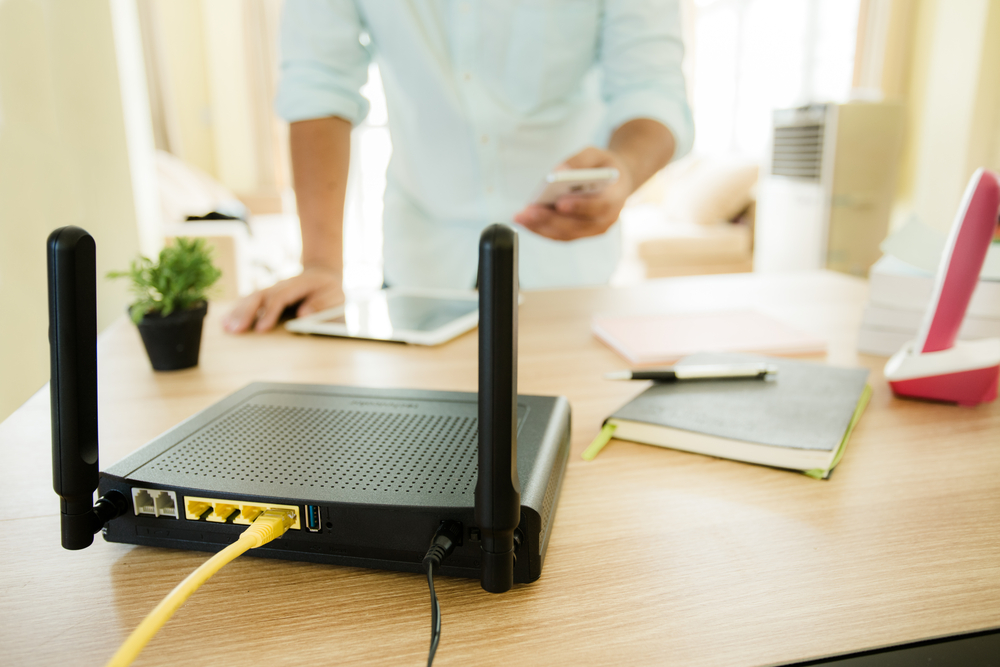
If you’re like most internet users, slow internet speeds might be the bane of your existence. Whether you’re trying to watch a movie on Hulu without it pausing every minute or are trying to play an online video game without your character freezing, slow internet speeds can be a major headache.

If you’re experiencing lag, buffering, or slow speeds, take a look at some problems and solutions below:

1. Outdated router

Over time, your router or modem can become outdated and decrease in quality of performance. If you’ve had your router or modem for a long time, it may be time for an upgrade. Another issue may be that your router needs to be reset. To reset your modem and WiFi router, unplug the power cords and remove any batteries, then wait at least 2 minutes to reinsert the batteries and plug the modem and router back in to ensure the reset is complete.

2. Too many devices connected to the internet

Having multiple users on an internet connection can lead to slow internet speeds. In most homes, there are multiple devices using your internet connection to function, such as phones, tablets, smart TVs, video game consoles, and voice assistants. Try disconnecting devices that don’t require the use of the internet and reconnect them when they do. In some cases, you may need to upgrade your internet plan to provide more bandwidth.

3. Computer problems

Factors such as bandwidth, latency, ping, jitter, and upload and download speeds aren’t the only reason your Spectrum internet might be slow. In some cases, it may be your computer, not your internet connection, that’s slowing down your internet speed.

Issues such as a full hard drive or a virus can result in decreased internet speed times. To determine if it’s your web-enabled device, disconnect it from the internet, and use a different device to see if performance is still sub-par.

4. Network latency is too high

Bandwidth and latency are two important factors that determine your internet speed. If your network’s latency is too high, you may be experiencing delayed internet speeds. Unfortunately, there are factors out of your control that can result in high latency, such as Spectrum throttling and congestion, that decrease performance quality.

5. You’re on a low-tier plan

Most ISPs offer a variety of internet plans to accommodate the needs of a variety of users. However, faster plans typically come with a higher price tag. To view your plan details, log in to your Spectrum account, and review your contract. Here, you’ll see what plan you’re paying for, along with the internet speeds, and will be able to determine whether or not you need to upgrade to a higher-tier plan.

Spectrum internet speed troubleshooting

Struggling with slow internet speeds is never ideal. If you’re looking to troubleshoot and speed up your Spectrum internet, take a look at these tips:

  • Use a wired Ethernet connection instead of a wireless connection, which tends to be faster
  • Close out of any downloads that are in progress
  • Close out of any programs, such as video games, streaming services, and video calls
  • Reset your WiFi router and/or modem
  • Place your WiFi router upright and off of the ground
  • Update firmware, anti-virus software, and other computer software
  • Disconnect any devices you aren’t currently using that are connected to the internet

There are a variety of factors that affect your internet speed. Trying these troubleshooting tips can be the solution you’re looking for to speed up your internet.


About the Authors

What Are the Best Rural Internet Options?

Those who live in rural America enjoy all the perks that come with country life, such as fresh air, wide open spaces, and a slower pace of life. Unfortunately, if you have to stay connected, life in a rural setting can also mean a slower Internet connection. It’s just one of the compromises you have to make.

However, when cable or DSL is not an option, the rural Internet options available to us now have improved over the years, meaning — for most, at least — we are steps ahead of dial-up these days.

laptopworkingtree

Satellite Above

For many living in a rural setting, satellite is one of the top options for Internet. This service works in a similar fashion as satellite TV, meaning the satellite is placed in orbit and enables the satellite dish installed at your house to connect with the orbiting satellite. An important thing to keep in mind with satellite service is that the southward view of the sky, where you place your satellite dish, must be unobstructed.

Some of the top satellite Internet providers are:

  • HughesNet
    Pricing/Service: Plans starting at $39.99 and includes speeds up to 15 Mpbs
  • Dish
    Pricing/Service: Service starting at $39.95 and includes speeds up to 10 Mbps
  • Exede
    Pricing/Service: Service starting at $39.99 and includes speeds up to 12 Mpbs

Mobile Wireless Broadband

Other rural Internet options include a wireless broadband service offered by companies like AT&T, Sprint, or Verizon. These carriers have different service plans which include the use of a mobile hotspot, such as a MiFi, which allows for several devices to connect to a Internet hotspot. Keep in mind, if you have several users on at once, and they are using up some serious bandwidth watching movies or playing online games, it could affect your overall Internet speed. (You can always run a bandwidth test to see what speeds you are getting with your MiFi.) In addition to using something as a standalone MiFi for Internet only, you can also use the tethering feature available on many smartphones or tablets, which turns your device into a hotspot. Be sure to check with your provider to learn about any additional costs for using the tethering feature on your mobile devices.

Wireless Broadband

You may want to see if there is a WISP — a Wireless Internet Service Provider — servicing the area you live in. The service is often available from a local ISP and usually works by using a point to point connection. The provider may need to install equipment, such as a small antenna to the top of your home, which then will communicate with their equipment which is often placed in an elevated location, such as a radio tower.

Photo credit: Flickr

About the Authors

What Is the Average Internet Speed in the USA?

If you have a broadband Internet connection (wired or wireless), you’ve got two main concerns: cost per month and speed. Faster networks mean quicker downloads and easier uploads, and over time they help minimize your use of bandwidth, which could save you money, depending on your provider. But despite the growing availability of high-speed fiber optic connections in the United States, the country’s network infrastructure may not measure up to other nations. What is the average US Internet speed, and how does it stack up worldwide?

Speed Test

320px-Speedometer_-kmh-Internet speeds are an estimation of how many megabits (one million bits) of data can be downloaded in one second. For example, a 10 megabit connection — or 10 Mbps — allows you to download 10 million bits of information in a single second. It’s important to remember, however, that when providers report speeds they’re usually talking about the maximum download rate possible, not the average. Heavy server traffic or technical glitches can severely hamper performance (remember: the purpose of performing a speed test is to determine how fast the data transfer is on your computer or network).

Fast or Falling Behind?

So what’s the average US Internet speed? According to CNN, the typical American connection speed is 8.6 Mbps. This is up 27 percent from 2012, and if you live in certain parts of the country, such as Vermont, expect a better-than-average 12.7 Mbps. Other sources report higher values, around 18 Mbps, but this data comes from users who chose to run online speed tests for their connection — in other words, users who already have above-average connections.

Why the Difference?

Right now, the US ranks 9th in the world for Internet speeds, one spot down from where it ranked in 2012. There are several reasons for this less-than-optimal position, starting with country size. Places like South Korea and Japan have significantly faster connections than the US; they also have much smaller land masses and larger urban populations. “Last mile” connections — the final leg between your provider and your home — are the most crucial and most expensive to maintain, and often aren’t worth the infrastructure cost for small towns or rural communities.

In addition, the United States suffers from a lack of similarly equipped providers; depending on where you live, you may have only one or two viable choices for Internet. Countries which rank higher in average Internet speed have three, four, or more companies vying for consumer dollars, companies that are prepared to install and test connections same-day and charge a significantly lower monthly rate.

So what really is the average US Internet speed? A respectable almost-10 Mbps, better or worse depending on where you live. Ideally, improved technology and greater competition will spur quicker, more reliable connections across the nation.

Photo credit: Wikimedia Commons

About the Authors

Changing Wireless Bands: Broad-Spectrum Issues?

Everyone wants data. Smartphones consume 24 times more data than traditional cell phones, while tablets use a whopping 120 times more, according to the US Federal Communications Commission (FCC). To transmit all this data, carriers are buying up virtual tracts of land, known as the wireless spectrum or wireless bands, but there’s a problem: Room is running out. What happens when there’s no more space for streaming data?

Mega Hurts

200px-Wifi_symbol.svg_Think of the wireless spectrum like FM radio. In a given area, no two carriers can transmit over the same frequency at the same time or they create interference. To deal with this problem, the FCC has auctioned off parts of the spectrum to companies, usually between 700 megahertz (MHz) and 2.6 gigahertz (Ghz). The rapid increase in smartphone and tablet use, coupled with network improvements such as LTE and 4G, has significantly increased the amount of data downloaded and uploaded by users, leaving wireless providers scrambling to buy more of the spectrum. The FCC now has two issues: First, do they allow big carriers to buy up all available space and force out small players? Second — and perhaps more importantly — where do they get more space to sell?

White Noise

According to a recent CNET article, the FCC wants to free up an additional 500 MHz of space by 2020. To do so, it has several options. It can wait for other government agencies to give up claims on wireless bands, or it can change the rules for blocks of spectrum such as satellites and then sell them to the highest bidder.

Another option is an “incentive auction,” aimed at getting TV providers to sell portions of their owned but unused spectrum at a premium. As reported by GigaOM, Google has already received permission to create a database of this “white space” and allow public access, letting users set up hot spot wireless networks almost anywhere and without interfering with other local signals. Expect that white space to shrink, however, as the FCC tries to convince television providers to sell their share of the coveted 600 to 700 MHz section of the wireless spectrum. The “600 block,” as it’s commonly known, is extremely valuable, not just because wireless space is at a premium but because these low-frequency signals can penetrate buildings, in turn providing far more reliable coverage in urban areas.

Time Will Tell

So far, there’s no word on exactly which wireless bands are up for grabs or exactly where the FCC will find another 500 MHz by 2020. In fact, some experts argue that even that much space won’t be enough as mobile device adoption increases along with user expectation. It’s possible portions of the spectrum may become unusable as companies “hold out” to prevent competitors from gaining a foothold or deploying new technology, but this may prompt government intervention or even sanctions if it goes too far.

The wireless bands aren’t full — at least not yet — and there are still white spaces out there available for public use. The market is shrinking, however, prompting bands to shift, narrow, or disappear altogether.

Photo credit: Wikimedia Commons

About the Authors