Android Speed Test: Five Quick Ways to Get Your Smartphone Running Fast

So you’ve performed an android speed test and it seems that the phone could be running a bit faster. Thankfully, you aren’t alone and probably won’t need to replace your phone before the contract period is up. Normal day-to-day usage of any smart phone tends cause it to slow down over time for a variety of reasons.

What are some of the best quick and easy ways to get your Android mobile device running at its optimal efficiency after performing an Android speed test? Here are five of the top techniques to try out on your phone.

Android

1. Clear the App Cache

Any computer’s application cache — including those on smart phones — eats up memory and other system resources over time. There are a few apps available at the Google Play store to help manage a smartphone’s app cache. The best ones allow you to set the cache to clear automatically after a certain period.

2. Uninstall or Disable Unused Apps

With the large number of free apps available on the Android platform, it is easy to download one, try it out, and forget that it’s installed on your phone consuming memory. Make sure to periodically go through your app collection and delete the ones you don’t need. If you may use it again in the future, simply disable it.

3. Use a Third-Party App Launcher

Though a third-party app launcher is not something that will free up system resources or memory, installing one of the many that are available for Android can enhance your smartphone’s usability factor, which makes the device easier to navigate.

4. Reduce App Bloatware and Clutter

Not everyone owns a Google Nexus, so most Android smart phones are laden with pre-installed carrier bloatware. Take the effort to delete any apps you never wanted in the first place in addition to any extra widgets and shortcuts you may have installed over time. Remember, these all use system resources and will slow down your phone.

5. Disable Background Data

Many installed apps, like social media or news apps, periodically check the internet for updates. Each time they ping the internet, it takes up battery power and system cycles. Make it a point to disable or even limit an app’s usage of background data which is a good way to save on your monthly data allowance.

Following these five simple steps will go a long way in improving your Android phone’s speed, as well as its power and data usage. Running that Android speed test doesn’t have to mean bad news!

About the Authors

WoW High Latency: How to Fix Latency Issues on World of Warcraft

WoW lag, or high latency, can be a real issue in the MMORPG (Massively multiplayer online role-playing game) World of Warcraft. High latency can be caused by several circumstances. While internal hardware can be the cause, this article refers to external devices and the Internet connection as the problem source.

Latency is the restricted movement of data from the transmitter to the receiver. Bandwidth and latency are not the same thing, but latency affects bandwidth. The bandwidth represents the speed of data in unrestricted conditions, while latency refers to the restrictive conditions that slow the data flow to the receiver. There is no cure for latency, but there are some things that can be done to help optimize the data flow.

800px-Router_1

Minimizing WoW Lag

Battle.net, World of Warcraft’s website, recommends a latency under 300 ms, however hard-core players want a latency of 30 ms or less. Latency can be detected when the graphics card is pushed to its limits. When a player is in an area with many other players, such as Stormwind, or fighting a boss battle in a 10-person raid and there are multiple spell-castings going on, then everything begins to slow. This is latency raising its ugly head.

Players can do a few things to find out where the latency is coming from and then hopefully minimize its effects.

  • Check the Realm Status: This may seem obvious, but it is the first step. If the realm status is showing a high latency, then the data is having problems at the server level. Hover the mouse over the Game Menu icon to see the world and home latency connections. If the world latency is high, then latency will be high for everyone.
  • Connection Type: A wireless connection will always add latency to bandwidth. Disconnect from the router and use a wired connection directly to the computer. Also, if others are using the router at the same time, it is possible that there are too many people grabbing for the same bandwidth.
  • Internet Connection Speed: While the game is open, press the “Esc” key, select “System,” and then select the “Network” option. Players with a high-speed Internet connection should click the “Optimize Network for Speed” check box. Those with a low-speed Internet connection should make sure the check box is not checked. The “Optimize Network for Speed” check box, when not checked, tells the game to not send as much data in each packet, which improves the gaming experience.
  • Drivers and Updates: Verify that every piece of hardware dealing with the acceptance of data is up to date. Modems, Ethernet cards, and routers all require either drivers or firmware to make them run. As technology advances to push data faster and easier through the same amount of space, drivers must be updated from the manufacturer to keep the hardware up to date.
  • Take an Internet speed test at BandwidthPlace. This will help to isolate where the problem lies. If the Internet connection is slower than it should be, then the player will know it could be a problem with the cable provider.

About the Authors

Five Streaming Devices You Need to Know

Here are five streaming devices that you should look into if you’re interested in finally weaning yourself off cable TV.

roku-3-chart-pics

Roku 3

Advantages:
• Supports 1080p video and dual-band WiFi streaming with built-in wireless and Ethernet.
• Has an all new interface that helps with the hundreds of streaming channels (750 to be exact) from Netflix, Hulu Plus, Crackle, MLB.TV, and Amazon. It also offers music, games and Internet TV, IGN, blip.tv, etc.
• It is super clean and very easy to use.
• The remote has a headphone jack; you can mute your TV and listen on your headphones.
• At $100, this is probably the best streaming device out there right now.

Disadvantages:
Roku 3 doesn’t provide users with YouTube (or iTunes). Though it has 750 channels, it doesn’t have every available channel.
• No AirPlay (or similar function).

appletv_smallsize.png

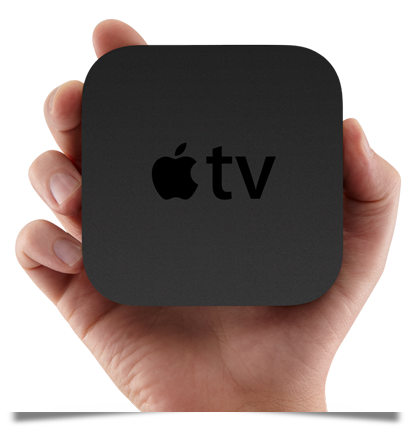
Apple TV

Advantages:
• Now features HBO GO.
• Big buttons and grid, with the iTunes Store up top, makes the user interface super simple.
• Get Netflix, Hulu Plus, and MLB.TV.
• With AirPlay, all of your music, videos and photos can be streamed from your iOS device to your TV. This is huge!
• At $100, this is a great streaming device.

Disadvantages:
• Even with the new addition of HBO GO and WatchESPN, there aren’t enough channels.
• If you don’t have Apple devices, you can’t use the AirPlay function.

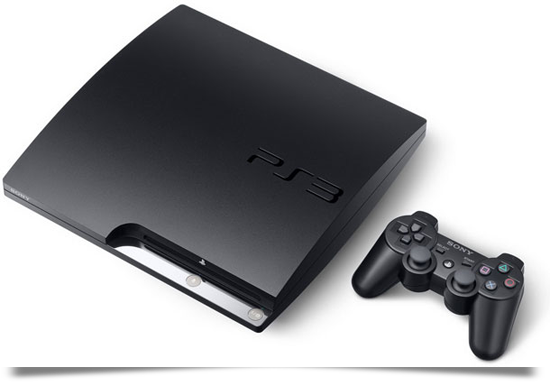
PS3

PlayStation 3

Advantages:
Games. Games. Games. If you’re a gamer or have children, you understand.
• A solid Blu-ray player for those who have a Blu-ray collection.
• NFL Sunday Ticket. Yes, every out-of-market game is available. If you’re an NFL fan who’s willing to pay a few bucks for a great app, this is your streaming player.
• The ability to stream media from PCs and attached USB drives. This is basically like AirPlay for PCs: Your PC has plenty of media just waiting to stream to your TV.
• A vast collection of apps such as Netflix, Vudu, Hulu Plus, Amazon, etc.

Disadvantages:
• $270 is pretty expensive for a streaming player.
• As amazing as the PS3 is, it’s really only for gamers. Plus, the controller is not really a remote, so you’ll have to buy one separately, which means more money out of your pocket.

bravia_1

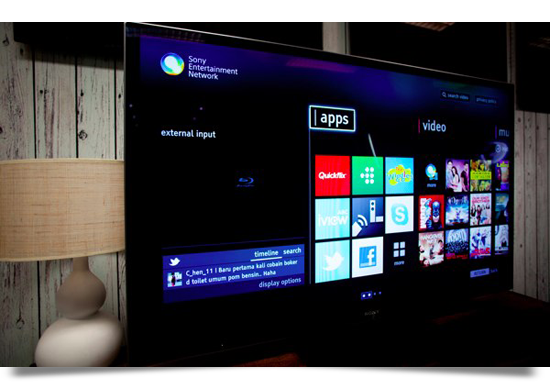
Sony Bravia TV

Advantages:
• Sony has stuffed this device with tons of content and channels, but one stands out: Skype. Imagine calling your loved ones or instant messaging your friends, all while sprawled out on the couch.
• YouTube is included. Now that YouTube has pay service, you can watch a lot more movies and television or stream Coachella performances from your TV — and in 3D!
• As with the PS3, you’ll get firmware updates regularly to make the Internet function bigger and better — a Smart TV is kind of like having a computer for a television.

Disadvantages:
• $1500 is expensive and you can buy a cheaper TV and a Roku 3 and get most of the same features.
• The navigation has a frustrating learning curve.

apple-ipad-2012-review-ios-home

Apple iPad

Advantages:
• Stream video from every service: HBO GO, WatchESPN, Netflix, Amazon, Vudu, Crackle, and more.
• Stream audio from every service: Pandora, Spotify, Songza, etc.
• If you have a keyboard and Dropbox, you now have a legitimate laptop.
• Stream from anywhere!

Disadvantages:
• $499 is expensive for streaming and the iPad really only works well with headphones.

Besides the five devices mentioned above, there are even more streaming devices available to include the Roku Streaming Stick, 3M Streaming projector, Boxee player, TiVo player, and Sony Blu-ray player. Do some research before buying (and make sure your WiFi is working and your broadband is fast—an internet speed test will help). Happy streaming!

About the Authors

5G Network Technology: What, When and Why?

While 4G wireless networks aren’t even fully available across the United States, the next generation, 5G network technology, is waiting in the wings. It is important to realize that these wireless networking monikers, 3G, 4G, etc., are more of an arbitrary distinction than a true scientific indicator. That said, expect 5G technology to show a marked improvement in data throughput over 4G.

600px-Wireless_Network_35

What is 5G Wireless Technology and When will it Appear?

In short, 5G wireless networking is the next evolutionary step in mobile communications technology. A new “G” tends to appear every 10 years or so. 3G phones started to become widely used soon after the turn of the century, and the first 4G networks began to show up around 2010.

Samsung is currently working on a 5G wireless network and expects to begin deployment of the technology sometime around 2020. In testing, the network has shown speeds of up to 1 Gbps and the company hopes to reach 10 Gbps before the time of commercial deployment. For comparison’s sake, current 4G technology maxes out at 100 Mbps. You speed test your current internet by accessing BandwidthPlace from your mobile phone. It leverages HTML5 technology to enable testing without having to download an app.

Some skeptics feel there isn’t the frequency spectrum space for the additional bandwidth needed for 5G technology. Because of this, some pundits speculate that other technical and pricing enhancements, like longer battery life, better coverage area and the return of unlimited monthly wireless access fees will be included under the 5G moniker, if wide deployment of the technology becomes impossible due to frequency spectrum issues.

Why should I Worry about the 5G Network?

Consider that even if the frequency spectrum is available, 5G wireless technology is still six to seven years away. When and if it becomes commercially available, expect data throughput speeds rivaling the fastest current wired connections. Some of the talked about improvements to wireless technology, like improved battery life and unlimited monthly wireless access, need to be implemented by the large carriers today, whether or not 5G becomes a reality by the end of the decade.

About the Authors

What is a VPN? Guide to Virtual Private Networks

Today’s world is connected by the internet. In an instant, businesses can conduct transactions across the globe, people can communicate with anyone, anywhere, and at any time, and a huge portion of the world’s economy relies on the world wide web. While this interconnectedness has brought the world together, it comes with a cost: a loss of privacy. That’s where a virtual private network (VPN) comes in.  

What is a VPN? Simply put, a VPN hides your information by sending it through an encrypted tunnel that’s connected to a separate network over the internet. There’s more to VPNs than meets the eye, and whether you’re a business owner or an individual, they can give you peace of mind knowing your data is secure.

If this sounds confusing, don’t fret. Read through for a complete overview of virtual private networks, what they are, how they work, and more. Or, if you’re looking for the answer to a specific question, use the links below to navigate to your answer.

What is a VPN?

A virtual private network (VPN) is a service that protects your personal data by connecting your internet connection to a remote server. When you use the internet with a VPN, your data is encrypted, which increases internet privacy by making it virtually untraceable—shielding you from prying eyes and cybercriminals using the same WiFi connection as you.

For example, if you’ve ever been to a coffee shop or the airport, you most likely connected to their free WiFi. Public WiFi is great, as it allows you to gain access to the internet for free. However, it comes at a cost, as anyone using the same public WiFi can potentially gain access to your personal data, such as your credit card numbers, business contacts, and Social Security Number. One of our top WiFi security tips is to use a VPN when accessing public WiFi to prevent people from intercepting your data.

How does a VPN work?

Now that you know what a VPN is, you’re probably wondering how they work. Your computer, along with other devices such as smartphones and tablets, come with an internet protocol (IP) address, which links all of your online activity. When you log onto your computer and open up your web browser, you connect to your internet service provider (ISP). 

Your ISP allows you to access the web and visit any websites or online resources of your choosing, and they save your internet traffic to their servers along the way. What you may not know is that your ISP can share your browsing history and internet traffic to third parties like the government and advertisers.

What does a VPN do with your internet activity? A VPN prevents your internet service provider from accessing your entire browsing history by creating a secure connection to another network. 

So, what is a VPN connection? A VPN provider creates a connection to its own IP address. When you connect to the internet with a VPN turned on, you connect to the VPN server’s IP address, not your own. Your VPN provider can have servers located thousands of miles away and all over the world. This means through a VPN connection, your internet activity will appear as if it’s located at one of these remote servers, not your own.

Along with hiding your search activity from your ISP, VPNs create an encrypted tunnel between your local network and one of your VPN provider’s remote servers. If you use a public WiFi network, your encrypted data is virtually impenetrable, leaving hackers and eavesdroppers with a pile of scrambled code.

Why do I need a virtual private network?

A virtual private network may sound confusing and unnecessary, so why use a VPN? While VPNs were originally used by businesses to connect multiple offices securely, more and more individuals today are using personal VPNs to build a home network and keep their communications and personal data secure when using WiFi networks.

Even if you consider yourself an open book, you might not feel comfortable knowing your online activity is being tracked and watched. If you want online security, you’re going to want a VPN. Take a look at some other reasons why you might need a virtual private network:

You want to access streaming services

Streaming services like Netflix, Hulu, and Disney+, along with professional sports broadcasts, are only available in certain countries. If you travel, you may not be able to access your suite of streaming services or watch your favorite shows and movies. With a VPN, you’ll be able to pick an IP address in your home country to gain access to your streaming platforms.

You travel frequently

Countries might have contractual terms put in place that prevent people from accessing certain websites. This means some websites you take for granted in your home country might not be available in a country you’re visiting. With a VPN, you’ll be able to choose a remote server in a different country to access restricted websites.

You regularly connect to public WiFi

When you connect to free public WiFi, whether at your local Starbucks or the airport, hackers might be able to intercept your data and steal your photos, passwords, and personal files. This is even true if the public WiFi is password protected.  

A VPN prevents cybercriminals from stealing your information because it encrypts your data, making it nearly impossible to decode. This way, you’ll be able to online shop, check your bank statements, and access your social media accounts knowing you took preventative measures to ensure no one’s watching.

You want more security

VPNs encrypt data transfers when you use the web. Encryption is the process of encoding your confidential information and turning it from plaintext to ciphertext, which can only be decrypted by authorized users with the encryption key. When VPNs are used, only computers at each end of the encrypted tunnel can access the information. This keeps all of your data, including search history, banking information, files, photos, and other digital data completely secure.

You want more privacy

Have you ever looked at a product online and seen ads for the same or similar products for the next few months? Perhaps you were looking for a new pair of running shoes or new curtains for your living room. Before you know it, every time you log onto your computer, ads for new Nike shoes or Home Depot curtains bombard your screen. This is because your internet service provider is legally allowed to share your information with third parties using your IP address. 

Your computer’s IP address can give away a lot of information about you, including your torrent download history and information about your location, including your city and country. A VPN will shield your online history from advertisers, government agencies, and other third parties, so you can browse the internet without your ISP tracking your digital footprints. 

How do I get a VPN?

There are numerous VPN service providers on the market today that businesses and individuals can sign up for, making it extremely easy to get a VPN. You also don’t need to switch internet service providers or buy any fancy equipment to use a VPN. To get a VPN, all you have to do is find a VPN service provider that meets your needs. Some popular VPN service providers include:

  • ExpressVPN
  • Norton Secure VPN
  • CyberGhost
  • Surfshark
  • NordVPN
  • TunnelBear

Once you sign up with a VPN service provider, you’ll be able to go to your computer’s settings and add a VPN connection. 

How do I choose a VPN provider?

When searching for a VPN provider, it’s important to find one that has your best interests in mind. Consider these factors when choosing a VPN provider:

  • Data Limits: If your internet usage is high, it’s best to ensure your VPN provider offers unmetered bandwidth with no data limits so that you can continue with your internet usage without fear of any data cap.
  • Price: Each VPN provider charges its own price, and as with many things in life, the more expensive option is often better. While there are free VPN service providers you can use, you can expect to be bombarded with advertisements or have some of your personal information collected and sent to third parties. Most VPN providers charge anywhere between $3 and $15 per month, and are often more secure and provide more bandwidth.
  • VPN Protocols: There are numerous VPN protocols, which are the rules that negotiate the connection between you and the VPN server. When choosing a VPN provider, make sure they use the most current protocols. The three common protocols are Point-to-Point Tunneling Protocol (PPTP), Layer 2 Tunneling Protocol (L2LP), and OpenVPN. Of the three, OpenVPN often provides the strongest security.
  • Accessibility: If you have multiple devices, such as a laptop, smartphone, and tablet, you most likely want your VPN to be accessible on each device. As you look for VPN providers, make sure they provide access to multiple devices.
  • Privacy: One of the most common reasons people use VPNs is to enhance their privacy. However, not every VPN respects your privacy. Make sure to always read the terms and conditions to verify the VPN provider has a no-log policy, which means they won’t keep track of your online activities.
  • Location: Another reason people use VPNs is to gain access to geo-blocked websites and resources. For example, if you’re traveling outside of the U.S. and want to watch Netflix, you may need a VPN to access the same shows. Make sure your VPN provider has servers in the country or countries you need access to.

What are the advantages of a VPN?

The core of the matter is stated in PCWorld, “…VPNs can be helpful tools for protecting online privacy, and you need not be an office drone to enjoy their benefits.” VPNs offer a host of alluring advantages. Creating a VPN at home can allow gamers to create a local area network (LAN) and connect with friends from other areas without having to go through third-party sites or servers. Or, businesses can keep confidential information secure when working from remote areas. Before long, everyone will have personal, secure networks for home, work, and play.

Some advantages of VPNs include:

  • Security: When you enable a VPN, all of your important information, such as confidential files, banking information, passwords, and other private details, travel through an encrypted tunnel. This makes it difficult for hackers to decipher the code and access your information.
  • Privacy: When you connect to your ISP, your connection is open to the world. This means random people and third parties like advertisers and the government can look at your data, log it, and use it without you knowing. 

They can also look at your IP address and show targeted ads and even charge different prices for products you were viewing online. As stated, a VPN encrypts your data and hides your IP address, making it challenging for third parties to track your activity.

  • Access blocked websites: Countries around the world have the ability to restrict access to certain content, such as social networks, games, and search engines like Google. Additionally, educational institutions and workplaces often use firewalls to block access to certain websites to block inappropriate content or increase productivity. With a VPN, you’ll be able to bypass filters and unblock restricted websites.
  • Remote access: For businesses, VPNs can increase productivity because they can make information available remotely from anywhere, such as an employee’s home or an office located overseas. If a problem arises at work and an employee isn’t at the office, they can connect to the VPN and access information and files they may need.

What are the disadvantages of a VPN?

While there are numerous benefits of VPNs, that doesn’t mean they don’t come with their own drawbacks. Take a look at some disadvantages of a VPN to help guide your decision-making process:

  • Legality issues: Unfortunately, some countries deem private networks illegal. If you live in a country or are traveling to a country where VPNs are illegal, you can face jail time or end up paying a hefty fine.
  • Decreased performance: When you use a VPN, it must connect to a private server before you access a website. This can cause performance issues and subject you to longer load times. If you’re experiencing slow internet speeds while using a VPN, use our internet speed test to get the metrics report you need to understand the quality and efficiency of your connection.
  • Privacy problems: In some cases, you might not have complete anonymity when using a VPN. Depending on the terms and conditions, some VPN providers may track your activity and send it to third parties. Or, a VPN provider might have to comply with the government and hand over your personal information to federal, state, or local authorities.

As with most decisions in life, it’s important to weigh the pros and cons to determine what choice is right for you. VPNs have many beneficial advantages that can protect your information on the web. However, there are some disadvantages that could cause problems down the line.

Key takeaways on virtual private networks

Virtual private networks create a secure connection between your computer and a remote server by creating an encrypted tunnel for your private information to travel through. They’re a popular security measure businesses and individuals invest in to protect confidential information. Here are some key takeaways on VPNs:

  • VPNs encrypt your data to make it untraceable by prying eyes and hackers.
  • Public WiFi networks are vulnerable, which means your information can be stolen. A VPN will protect your files when you connect to public WiFi networks.
  • A VPN hides your IP address by connecting to a remote server with a different IP address. This prevents your internet service provider from tracking your online activity and handing it over to third parties like the government and advertisers.
  • There are many reasons you may need a VPN. If you travel frequently, want to access streaming services abroad, regularly connect to public WiFi, or want more privacy and security, a VPN can fix all of these problems.
  • It’s important to keep certain factors in mind when choosing a VPN service provider, such as the VPN protocols they use, their accessibility, locations of their servers, and privacy policy.
  • VPNs have many advantages, such as the ability to access blocked websites, secure your information, enhance privacy, and provide remote access.
  • VPNs also come with several disadvantages, such as legality issues, a decrease in web performance, and privacy problems.

About the Authors

Streaming Video Services You Need to Use

Streaming video services are fast taking over. It’s time to dive in and get acquainted with some of the top choices, all of which are available on desktops, smart TVs, streaming players, game consoles, tablets and mobile phones.
tv_stream

Netflix

Netflix is the leader when it comes to streaming video services. Even after a risky marketing transition with Qwikster, they’re still tops in the market. Did you know that traffic to Netflix makes up approximately one third of the bandwidth use in North America?

Netflix has a great selection of new releases, old classics, and Indie movies. Plus, its television content is currently unmatched. Netflix also has a huge selection of children’s programming. At $7.99 a month, Netflix is just too good to be true. If you’re not streaming with Netflix now, its time you tried it out. Netflix is significantly better than any other streaming video service out there.

netflix-700x400

Hulu

Hulu is the next best option to Netflix. Hulu is free online, but costs $7.99 a month for its mobile, smart TV, and player-streaming app, Hulu Plus. Hulu is mainly for television. In most cases, you can view television shows the day after they air! Unfortunately, Hulu Plus still has ads, even in their movies, which is a drawback when you’re already paying a monthly fee. But if you really love Saturday Night Live, The Office and 30 Rock, you can watch them all on Hulu.

hulu_700x400

Amazon Instant

Amazon Instant is slightly cheaper than Netflix or Hulu Plus and will run you approximately $6.67 per month. You get access to all the streaming titles on Amazon Instant Video, plus free two-day shipping on all products sold by Amazon. Like Netflix, Amazon Instant is also commercial free. If you want The Waking Dead, you’re going to pay extra, which is something to think about before signing up.

VUDU

VUDU showcases on-demand new releases and television streaming. It’s free to sign-up and can be used on smart TVs, gaming consoles, streaming devices, tablets and desktop computers. VUDU stands out because movies are available the same day they are released on DVD, which makes it a great option. Another good reason to use VUDU is because of HDX, the highest quality High-Definition content available, also in Dolby Digital Plus 7.1 surround sound. If quality is important to you, definitely check out VUDU.

HBO GO

HBO GO is, without a doubt, the top mobile streaming app available right now. They have one of the best-looking iPad apps around. Like Netflix, HBO gambled on being the first cable network mobile streaming app and that gamble has seriously paid off. At present, the player streams best on a WiFi connection, while the audio is best with headphones, not speakers. The app would really dominate if it was a direct-to-consumer app rather than a “subscription-only” service. Hopefully, that is in the works.

Unfortunately, there are still some hurdles to be overcome with streaming. Not every movie and TV show can be streamed and you can’t stream sports or local news; however, video streaming is a wonderful companion. All you need is a High-Speed Internet connection—test your Internet speed with a bandwidth speed test—and a streaming device. What are you waiting for?

About the Authors

How to Make a GIF: The Best Online GIF Creators

The GIF has been around since the days The Cosby Show was still on the air and the original NES was king; however, it seems the GIF is experiencing a revival of sorts.

GIF was officially named Oxford Dictionary’s USA Word of the Year for 2012, earning the status as not only a noun, but a verb. According to Oxford, the official definition of GIF is: (verb) to create a GIF file of an image or video sequence, especially relating to an event. Be prepared as soon all the kids will be vying to make a GIF. Or maybe they’ve already started.

ronswansondancing.gif

Created in 1987 by Steve Wilhite of CompuServe, the GIF has stood the test of time. No matter how you choose to pronounce the word, you can’t deny the GIF is everywhere these days. GIFS sure have come a long way since the under construction and dancing baby animations of yesteryear.

Do you think it’s time to jump on the bandwagon and make a GIF? Maybe you need a perfect Doctor Who reaction GIF to reply back to a coworker’s email or perhaps you want to start your own Golden Girls GIF-themed Tumblr.

One of the best ways to make a GIF is by using photo editing software like Photoshop. If you think about it, Twitter’s Vine app, which allows you to create a six second looping video, is really GIF-like in its own way.

If you don’t have Photoshop or don’t want to use Vine, here are other online GIF creators you could try out.

What are you waiting for? Tonight we’re gonna make GIFs like it’s 1999!

  • MakeaGif — Simply upload your images to Makeagif.com and use them to create your GIF. Once you have the images uploaded, you can customize your GIF by changing the animation speed or resizing the images.
  • Gickr — This site also allows you to upload images from your computer, or from Flickr, to make a GIF. There is also an option available to make a GIF from a YouTube video. All you do is provide the link to the video.
  • GifNinja — Select the files you want to use for a GIF, including multiple images or a movie file. Once you are done, download your GIF and you are ready to share.

About the Authors

Which Broadband Internet Service is Right for You?

A true test to the type of broadband Internet service you need is how the service will hold up to your online needs. Want to watch streaming video or listen to streaming music? Are you into online gaming? These and other activities should be taken into consideration before choosing the type of broadband service that suits your needs.

broadbandinternetspeed

What’s your speed?

If you currently have broadband Internet service, you can test the speed of your service online by using an Internet speed test. This test will not only show you your current speed, but also help you determine if you need an upgrade in service.

Broadband services available

The types of broadband technologies include DSL, cable modem, wireless, satellite, and fiber. Not all of these services may be available for everyone, so it’s best to see what is available in your area.

  • DSL – uses wireline transmission technology to transmit data faster over traditional copper telephone lines which are installed in homes and businesses.
  • Cable modem – allows cable operators to provide broadband service using the coaxial cables, which deliver cable TV to your home.
  • Wireless – connects to the Internet using a radio link between your location and the service provider’s facility.
  • Satellite – this is a type of wireless broadband that uses satellite technology to link customers to broadband service.
  • Fiber – converts electrical signals carrying data to light and sends the light through transparent glass fibers. This method of broadband is much faster than DSL or cable modem speeds. It is not widely avaiable yet; however, Google Fiber may change that.

How fast can you go?

What type of speeds do you need to do what you want, be it common web browsing, watching movies or online gaming? We took a look and compared different types of broadband speeds, thanks to some help from the Broadband Classroom.

Speed: 1.5 Mbps to 3 Mbps

You can: web browse, email, listen to streaming music and watch standard definition video (SD)*. At this speed, you can download a book 1 MB in size in 2.7 seconds, a song at 4 MB in 10.7 seconds, and a movie 6144 MB in size in 4 hours and 33 minutes.

Speed: 6 Mbps to 10 Mbps

You can: Play online games and watch videos on demand, but only on one device. If you have more than one person sharing your connection, expect buffering*. At this speed, you can download a book 1 MB in size in 0.8 seconds, a song at 4 MB in 3.2 seconds, and a movie 6144 MB in size in 1 hour and 22 minutes.

Speed: 10 Mbps to 15 Mbps

You can: Attend classes via remote education (distance education programming courses online) and watch HD TV programming*.

Speed: 15 Mbps to 50 Mpbs

You can: Use HD video surveilliance, and run multiple activities online (streaming video, music, and gaming) on more than one device, without delays*.

Speed: 50 Mbps and up

You can: Use video conferencing with multiple users, use remote super computing, and collect of data in real-time*. At this speed, you can download a book 1 MB in size in 0.1 seconds, a song 4 MB in size in 0.3 seconds, and a movie 6144 MB in size in 8 minutes.

If you are just a casual web browser who needs access to check an occasional email, you may not need download speeds of 50 Mbps. If you and your family have several connected devices, with each person using some sort of streaming service at one time, then you may need one of the higher speeds available. It’s best to evaluate your needs, so you won’t be left in the dust, buffering indefinitely.

*Information related to broadband speeds comes from David Salway, director of the Broadband Program Office for New York State.

About the Authors

Top Five Streaming Music Services

Some streaming music services to use

There are an incredible amount of streaming music services now, but unfortunately a lot of them tend to be subpar because of minimal content and bad-user experience. Here are some strong, free music streaming services for music folks who love streaming at work and on the go.

headset-world-700x400

1. Spotify

Spotify is one of the best music streaming services available. If you know what you like by artist, album and track, you don’t need programming. That’s the magic of Spotify. It’s comparable to a free iTunes Store. If you’re not using Spotify, you’re seriously missing out. The best thing about Spotify is their immense library, good taste, amazing quality and their iPad app version just to name a few. With Spotify, you don’t even need the paid service at all. And if you do pay, it’s not that expensive. Try it out!

2. Pandora

Pandora is the streaming radio mecca of the online world and is where music streaming began to get serious. It may be safe to assume that most people have a Pandora subscription and a mobile app as the iPad app interface is amazing.

3. Songza

Songza has Internet radio playlists compiled by music critics, legendary DJs, musicians and music lovers. You can even submit a playlist (i.e. a 70s Turkish Psych playlist of your favorite artists like Selda and Baris Manco). They also have some amazing playlist categories like working, boosting your energy, hanging out or taking a sunny stroll. Even cooler offerings are the Record-store Clerk categories, like Classic Prog, Krautrock and Early West Coast Punk (i.e. The Germs, Gun Club, Black Flag). Plus, the mobile app for iPad and iPhone are both totally amazing.

songza_700x400

4. Whyd

Whyd is like the Pinterest of music and could be the solution for all of your endless YouTube and Soundcloud bookmarks. The service is part organization tool—like an RSS reader—and part social network. It can save anything from YouTube, Vimeo or SoundCloud and is totally free. Check out their website to request an invitation so you can start uploading.

whyd-700x400

5. Songdrop

Songdrop is another tool with a bit of a fancier UI/UX and the spinning records are super-cool. What makes Songdrop different is the “drop” feature, which is very similar to the Pinterest “pin” feature.

There are many more music streaming services and many more soon to come, but for now, try these out and start developing your own process for collecting and listening to free streaming music.

Alan Henry and his life-changing article called The Best Streaming Services You Aren’t Using (But Should) was an influence while writing this article.

About the Authors

Video Streaming: How to Optimize Your Internet

You have the popcorn, chips, snacks and drinks all set up. A marathon viewing session of your favorite show online is about to begin, but there could not be a worse time for your video streaming experience to be ruined by the constant buffering of the video you are trying to watch.

Here are a few things you can do to optimize your Internet for video streaming.

Check your Internet speed

If you have a lousy Internet connection, it only makes sense that any attempts to watch streaming video is going to be a challenge. Check the speed of your Internet connection by using an online Internet speed test.

The recommended connection to watch videos on Netflix, is at least 5 Mbps . To watch videos on Hulu.com, they recommend a downstream bandwidth of at least 1.5 Mbps for a smooth playback experience. The requirements for watching video on Hulu Plus on your TV is download speed of at least 3 Mbps for High Definition videos and 1 Mbps for Standard Definition videos. If your connection doesn’t match these requirements, then you may need to consider an upgrade in service.

streamingvideo

Adjust your settings

On Netflix and Hulu you can adjust the video quality settings which may be helpful if you have a slower Internet connection. Adjusting this setting to a lower video quality or choosing the best or auto setting for your connection speed may help prevent the videos from freezing up or buffering during play.

Check your bandwidth usage

Another thing to check is the amount of data you are using while watching a movie or TV show online. If you are watching a movie on a computer or laptop and simultaneously downloading large files, this could put a strain on your bandwidth connection. In addition, if you have multiple devices connected to your Internet connection, and all are consuming large amounts of bandwidth, this can slow down your video streaming process. You may want to consider closing down some of these devices while watching a movie.

Get wired, checking interference

If all else fails and you are sick of video quality that reminds you of Internet speeds from the era of dial-up, you should consider using a direct Ethernet cable connection. If that’s not an option, keep an eye out for devices that may cause interference with your WiFi connection, such as cordless phones or using a microwave. (If that’s the case, maybe you should save the popcorn for later.)

Hopefully some of these tips will improve your online viewing experience and help with those buffering blues.

About the Authors