Best Sites to Find Word Templates

Word templates are a great resource: they allow you to create professional-looking documents in a minimal amount of time. Legal documents, flyers, and newsletters are just some of the various types of templates that you can find on the Internet.

templates

Even if you cannot find exactly what you are looking for, you can easily modify a template to suit your needs. Several sites provide templates. Which will be best for you? Here is a quick list to make your search easy and convenient:

  • Microsoft: It is no surprise that the creator of Microsoft Word would have a variety of Word templates for users to download. The abundant collection includes certificates, book covers, wedding invitations, and so much more. Microsoft carries templates for Office 2003 through the new Office 365.
  • Free Templates Depot: This site allows users to submit their own templates, and, in turn, allows others to download those templates for free. It offers a lot of flexibility for users looking for just the right template. One nice thing about this site is that it explains what the templates are specifically for. For example, if you are looking for a freelance web development work invoice, they have it. When you click on the link to see if the invoice is the kind you need, it offers information about invoices. The site informs the reader of the contents of invoices and explains in detail what each section of the invoice is used for.
  • WordDocuments: This site does not really offer any more than the other two sites, but it’s a good resource to have in your repertoire of templates sites. The site is well organized and is user friendly for finding templates in different categories. Tickets, menus, and faxes each have their own categories right on the front page, which makes finding the right Word template a breeze to find.

Many other sites can also supply you with the right Word templates. Most of the sites are designed to connect you with the template you are looking for quickly and easily. Sometimes, though, you may not know exactly what you are looking for. Don’t wait until the last minute. Find a series of sites that you think will fit your needs. That way, when you are in a crunch and need to find a specific template, you’ll know right where to go.

About the Authors

Should You Use Your Thunderbolt Port or USB? A Simple Guide

When it comes to connecting external devices to your computer, USB often is considered to be the go-to interface for most devices. However, Intel has recently introduced the Thunderbolt port standard, which is designed to offer much higher performance than the USB standard. Unfortunately, one of the biggest challenges to Thunderbolt adoption is that only a few Mac devices have Thunderbolt ports, while most computers in general have USB ports. Both systems have their strengths and weaknesses. Here are a few considerations to keep in mind when evaluating the two technologies:

The Need for Speed

For anyone who needs high-speed data transfer rates, Thunderbolt takes the lead with speeds up to 2.5GB/S, while USB 3.1 has speeds up to 10Gb/s. Although these speeds sound similar, GB/s translates to gigabytes per second while Gb/s translates to gigabits per second. While the math behind calculating the exact transfer rates is difficult, the bottom line is if you’re a professional doing extensive multimedia work or a professional who often transfers large amounts of data to external drives, you will want a Thunderbolt port in your next device.

6784658523_4f90a4510b

Concerns Over Compatibility

One of the biggest caveats to Thunderbolt is that adoption is currently limited to a handful of modern Mac devices. USB, on the other hand, has been around for decades and is backwards-compatible with prior USB editions, making it more widely supported than Thunderbolt. If you often work with a variety of devices, you’ll want to focus most of your budget toward USB devices to ensure that you can work on all your systems.

Another key fact to keep in mind is that Thunderbolt cables are much more expensive than USB cables — often $50 for a two-meter cable as opposed to a few bucks for a USB cable — meaning if you’re on a thin budget, you’ll want to stick with USB even if you have a Thunderbolt port on your device.

Which One Should You Pick?

Ultimately, when it comes to Thunderbolt and USB, the two technologies each have their strengths and weaknesses, making them both solid standards for high-performance computing. As a rule of thumb, Thunderbolt is typically ideal for multimedia producers who often need high transfer speeds and who do the majority of their work on Macs with a Thunderbolt port. USB, though, is always going to be the leader in compatibility since it has been around for decades and most device makers already have integrated USB support into all their devices.

Fortunately, as many Thunderbolt devices also come with USB ports, you can use both technologies side by side depending on your needs.

Photo credit: Flickr

About the Authors

What Is a Smart TV?

Just as smartphones revolutionized the mobile industry, smart TVs are set to do the same for televisions. Here’s everything you need to know about a technology that’s just got a whole lot smarter.

If you have seen the ads and heard the phrase but are still asking yourself, “What is a smart TV?” you’re not alone. Fortunately, there’s never been a better time to find out why smart televisions will change our viewing habits beyond all recognition.

SmartTV

Think Smart and Outside the Box

In a nutshell, smart TVs allow you to watch traditional television. What makes them special? They also have a built-in Internet connection, allowing you instant access to video streaming sites such as Netflix, instant messaging, and social networking. The newer models come equipped with a full web browser, allowing you complete access to everything the Internet has to offer. Obviously, a reliable and fast Internet connection is essential for any smart TV to fulfill its potential. Most models come with a combination of an Ethernet port, allowing you to connect directly to your home broadband router, and built-in WiFi hardware.

What Is a Smart TV Used For?

Smart TV functionality depends to a degree on the make and model, but most offer access to social network giants such as Twitter and Facebook, with a few featuring IM applications like Skype. Some smart TVs at the higher end of the scale incorporate a webcam to enable full-screen video calling. Yet when people ask, “What is a smart TV?” they’re usually wondering if it offers video on demand (VOD) services. The good news is that it does, which is probably its biggest selling point. With VOD alongside subscription-based services such as Netflix, you can access free services such as YouTube through your television.

Televisions With Apps

Due to the app store phenomenon of the last decade, which has ensured that smartphones and tablets have pride of place in millions of homes, some TV manufacturers eager to emulate the success of Apple’s App Store and relative newcomers such as Google Play have developed their very own online stores where people can download a whole range of apps and games to their smart TV. Tech giants such as Samsung and Panasonic have led the charge. The Panasonic app store already boasts a wide selection of games to download.

It’s Looking Smart

With the recent introduction of optional extras such as smart TV touch pens, which allow you to write on the television screen, interactive smartphone applications, and game controllers to create more of a gaming experience, the smart TV is definitely here to stay.  One day in the not-too-distant future when someone asks, What is a smart TV?”, it’ll be akin to someone asking today, “What is a mobile phone?”

Photo credit: Wikimedia Commons

About the Authors

Best Sites to Find Excel Templates

Excel templates are a must for those who are not professionals with Microsoft Excel. Excel not only requires a bit of training, but it is also often helpful to have some coding knowledge to use the program to its full capabilities. Many companies find themselves having to pay developers to create the right spreadsheet for their business. However, many online sites offer free templates to those without the tech savvy to create a great spreadsheet from scratch.

excel-template

Now you can find the right template and wow your business associates with your abilities in Microsoft Excel. Here are a few places that offer great templates:

  • Microsoft: Microsoft has several Excel spreadsheets available for download, and the best part is that they are completely The wide variety of templates available cover Microsoft Excel 2003 to the present.
  • SpreadsheetZONE: Here you can find specific and unique spreadsheets. SpreadsheetZONE has spreadsheets for life calculators, translation services, and even planetary motion. The site allows you to upload your personal templates for the rest of the Internet to use. It’s a good rescource for everything from your run-of-the-mill basic templates to specialized hobby-specific templates.
  • Excel Templates: Although this site has several templates for everyday use, it also has hundreds of templates for the business-oriented. You can find Excel templates on stocks, ROI, or profit and loss spreadsheets. It also has games, sports, and wedding templates for those more personal occasions in your life.
  • Vertex42: This site offers many free templates, but it can also make custom spreadsheets for your business. If you are looking for a specific template and nothing else you have found fits the bill just right, then these guys can make it happen.

Excel templates help to make the creation process easier for all your spreadsheet needs. You may want to visit these sites and see what each of them has to offer before making a decision. You may even find that there are a few spreadsheets out there for things in your life that you realize you could use a spreadsheet for.

Photo credit: Flickr

About the Authors

What Is a BitTorrent Downloader?

binary-code-1-1159613-mBitTorrent downloading is one of the hottest trends on the Internet. However, despite its popularity, it also remains fairly misunderstood due to the fact that it can be used for a variety of purposes, some of which are controversial. The biggest thing to keep in mind when embracing a BitTorrent downloader is that it is simply a way to move large files across the Internet without needing expensive servers. By using a solid BitTorrent downloader, you can download a variety of content with ease. While there are many torrent downloaders on the market, one of the best downloaders available for free is uTorrent because it is lightweight and simple to use.

The Controversy of BitTorrent

It is crucial to note that the technology can be used for both good and bad purposes. BitTorrent services are considered to be havens for malware and piracy due to the fact that BitTorrent doesn’t rely on central servers to host files. Instead, BitTorrent is a peer-to-peer (p2p) protocol which allows users to find torrents by using directory sites. From there, users simply click the link, and their BitTorrent downloader will launch and download the file.

However, many of these directory sites are based overseas and link to pirated music, movies, and software. Since p2p networks don’t rely on central servers, they are difficult for authorities to police.

Legitimate Uses for BitTorrent

Despite the controversial uses of a BitTorrent downloader, there are many legitimate reasons to use the technology. One of the most common uses is the distribution of open source software, such as Linux distros. Since these packages often are one to three gigabytes, the bandwidth costs on a traditional server would be astronomical.

Many broadcasters also use BitTorrent to distribute podcasts and video content as a way to reduce server management costs. Some musicians and filmmakers have even released music and films through BitTorrent as a way to build up publicity.

The Importance Of A Speed Test

When using a BitTorrent downloader, it is crucial to use an Internet speed test to ensure your torrents are being downloaded efficiently. Additionally, when you are downloading torrents, some Internet service providers may throttle your Internet speeds. While every Internet provider has its own terms and conditions, it is crucial to note that illicit BitTorrent usage can result in serious legal implications. On the other hand, if you’re using torrents for a legitimate reason, the Internet provider is more likely to remove the caps.

About the Authors

Three More Streaming Music Services You Need to Try

We’ve covered streaming music services before, but just when it seems like you know them all (including Spotify, Pandora, and Rdio), you discover some more (such as Xbox Music, Songza, and Whyd). Here are three (good!) streaming music services you may not have heard of:

MOG

music_streaming1MOG has been around since 2005 and has gone through numerous versions. What makes MOG attractive is its dedication to sound quality. At 320 Kbps, it has some of the best streaming sound quality available.

Log in with your Facebook account (or email), then pick your service: Free, Basic ($4.99/month), or Primo ($9.99/month). With free, you have a limit of free songs — you even have a meter that resembles a gas gauge on an automobile dashboard — so to really use MOG regularly, you have to either pay or else get friends to join (and win more free music).

MOG is really best for new releases, so if you love the latest and greatest, MOG is a great source. Most tracks will be free on other services (Xbox Music for example). But if you love high-quality sound, especially if you love your headphones, MOG is one of the best.

8tracks

If you like Internet radio streaming (such as Pandora), then you should check out 8tracks. It’s made up of thousands of individual user-generated playlists. New playlists are displayed on the home page. You can choose from people you follow or from genres (by tags).

Although listening to playlists and discovering music is fun, the real appeal of 8tracks is creating your own playlists. Just upload songs from your computer (or 8tracks will find the song from Soundcloud, for example), write a description, place some tags, and upload an image. Now you have a playlist!

songdrop

SongDrop

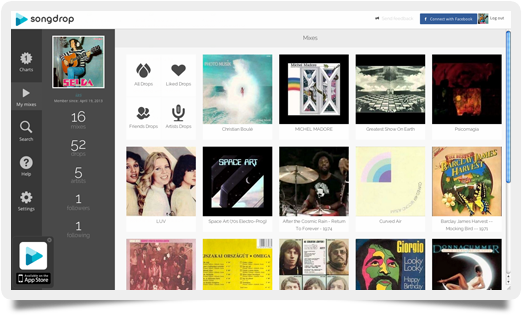
I saved the best for last. If all you do is find free music on YouTube and SoundCloud, you probably have a mess of URLs bookmarked but no way to really play all of them easily. Songdrop solves your issue and does much more, because Songdrop is 100% built by users from YouTube, Soundcloud, Tumblr, Bandcamp, Vimeo, and others. Plus, the player is really amazing. It also has a mobile app version.

What makes Songdrop so cool is just how easy it is to use. You find your track on the web, then drop the track using a bookmarklet or Chrome extension. All tracks are displayed like records, so when you play a track, the record literally spins like vinyl (pretty cool, right?). If you’re interested in finding out what other folks are listening to, you can always listen to user feeds, but the purpose of Songdrop is more tool (for your music) than radio. Songdrop has an insane amount of potential to grow, and we’re sure it will.

Happy streaming!

About the Authors

Some Internet Service Providers Offer Free WiFi

When it comes to your routine monthly expenses, cell phone service typically is one of the biggest-budget items the average person deals with. Despite voice and text packages becoming increasingly affordable through unlimited bundles, every major US carrier except Sprint and T-Mobile has done away with unlimited data plans. Even with those two carriers, however, bad reception and the hassles of tethering can make it difficult to reach top Internet speeds. Fortunately, many Internet service providers are setting up free WiFi networks nationally, which help to reduce cellular data usage while providing faster speeds.

man-on-laptop

More Coverage Than You Might Expect

Although it is impossible to name every provider that offers free WiFi, start by checking with your local cable provider, be it Cox, Comcast, Optimum, or Time Warner Cable. These internet service providers all are part of the Cable WiFi Consortium, a group of cable providers who have teamed up to provide their customers with a network of hotspots across the US. For cable subscribers, access to the network is offered at no additional charge; however, non-subscribers can access the network for a nominal fee.

If you aren’t a cable subscriber, some companies such as Verizon Fios and AT&T also offer WiFi access across the US, which can help to complement any wireless subscription. As time goes on, you can expect to see WiFi coverage improve nationally, because cellular networks are costly and expensive to build. This means most wireless carriers will need to push customers onto WiFi networks to improve the reliability of their cellular systems.

The Importance of a Speed Test When On the Go

When you’re out in the field, you usually will have a variety of WiFi networks to choose from. If you want to make sure you’re connected to the best network, it is vital to use an Internet speed test to ensure you use the best network for your needs. Although many apps on the market measure Internet speeds, you should use a site which works on mobile and traditional devices because that ensures the speed test is uniform regardless of the device.

About the Authors

How to Test Your Comcast Upload Speed

Checking your Comcast upload speed is as simple as going to Comcast’s site and clicking on a link. As easy as this sounds, several other factors come into play when you’re trying to determine an accurate upload speed (remember: check your bandwidth performance regularly with an Internet speed test). Software, hardware, and network setups can all be culprits in giving a false reading.

Comcast

Software

Programs such antivirus tools and firewalls will slow down data package exchanges, which in turn will slow down upload speeds. You could disable these programs to get a truer rating, but this is not recommended, as disabling these programs would make your computer vulnerable to viruses.

Hardware

Any wireless devices should be hardwired to the device you are testing. Wireless devices slow down upload speeds because of the added latency from sending data across open radio waves.

Remove excess devices in the network. Connecting to the modem, then to the router, then to a personal server machine, and then to the computer can add more latency issues, causing an incorrect reading. The more devices the signal has to pass through, the slower the reading will be.

Testing the Upload Speed

To test the Comcast upload speed of your device, do the following:

  • Go to the Comcast Speed Test site.
  • Click the server on the map closest to your location.

The tool will first test your overall latency. The smaller the number, the less interference you are having with the connection. Then the tool will test the device’s download speed. Lastly, the speed test will check and display your upload speed.

The real question here is what is the upload speed? When testing your Comcast upload speed, you may get a lower value than you expected. In other words, the speed in which you upload data will almost always be lower than what your network’s capabilities are. So, when deciding the data speed you require, don’t look at the numbers Comcast gives you. Instead, connect your specific device to the network and run the speed test. Then decide if you need faster speeds or if a slower speed will work fine.

About the Authors

Ethernet: How Fast Can it Really Go?

In the late 1980s, Ethernet became the dominant local area network (LAN) technology, beating out competitors such as the token ring and token bus — which simply weren’t able to keep up with changing market demands or shift their infrastructure to twisted pair copper wiring. Connections based on this technology remain popular today, and it has undergone significant upgrades to improve transmission protocols, control access, and increase speed. But how fast can this LAN front-runner really go?

Of LANs and Ether

The concept got its start in the 1970s at Xerox’s Palo Alto Research Center (PARC) thanks to Robert Metcalfe, who was looking for a way to improve local area networking that didn’t rely on bus or ring systems. In a bus system, connections are made between computers in series; one runs to the next, and then next, and so on until the end of the line. Ring systems are similar, expect for the final link in the series, which connects the first computer to the last.

Ethernet_RJ45_connector_p1160054Metcalfe’s system was instead based on ALOHAnet, a radio network in the Hawaiian islands. All stations on the network broadcast using the same frequency and sent out transmissions whenever they wanted. This raised the problem of signal collision, which ALOHAnet dealt with by having a central transmission location send a “message received” acknowledgment. If the transmitting station didn’t get this signal, it tried again later. Metcalfe improved on this system by designing Ethernet stations to check if the transmission lines were idle; if not, they would wait to send.

The name of this networking technology came from the disproved theory of “luminiferous ether” which was once thought to be the neutral medium through which all electromagnetic waves moved. The Xerox team’s design offered a similar functionality, and when the system rolled out at PARC, it transmitted a whopping 3 megabytes per second (Mbps) over coaxial cable. But this was just the beginning.

Need for Speed

Ethernet speed first increased with the change from coaxial cable to twisted pair copper cables on the CAT5 standard. This allowed connections to transmit at 10 Mbps. Fast Ethernet was introduced in 1995 and allowed transmissions of up to 100 Mbps. Further developments saw the technology cross several more speed barriers: for example, 1 gigabyte per second (Gbps), 10 Gbps, 40 Gbps, and finally 100 Gbps. In many cases, the factor limiting network speed is not a user’s Ethernet card but rather his broadband connection to the Internet. The Institute of Electrical and Electronics Engineers (IEEE), responsible for standardizing network technologies, has now set its sights on 400 Gbps and 1 terabit per second (Tbps) connections, but there’s no word yet on when those will be commercially available.

The bottom line? Ethernet-based LAN networks are the global standard, and with good reason. Even without the use of fiber-optic cables, the technology has achieved blistering network speeds. All indications are that further increases aren’t just technically feasible but make smart economic sense for business and home users alike (remember: check your bandwidth performance regularly with a speed test from BandwidthPlace.com).

Photo credit: Wikimedia Commons

About the Authors

Can an iPhone Be Hacked?

If you’ve ever asked yourself, “Can an iPhone be hacked?” the answer, though it may surprise you, is a resounding “yes.” Here’s what you should know:

Hacked Off

An iPhone is more than just a mobile phone: it’s a personal computer you carry in your pocket, and like any computer, it contains a lot of personal and precious data. It also contains an operating system similar to that of a computer, which makes it highly susceptible to the growing army of unscrupulous and innovative hackers who just love a challenge. Despite Apple’s team of engineers working around the clock to resolve any security issues, the iPhone remains a potential and rewarding target for cyber criminals.

iPhone_at_Macworld_-rear_view-Can an iPhone Be Hacked Remotely?

Due to the intensive and watertight security of Apple’s iOS, having your iPhone hacked remotely has never been considered a realistic threat or something for iPhone users to lose sleep over. However, way back in 2009, at the Black Hat conference in Las Vegas, security experts Charlie Miller and Collin Mulliner exposed an iPhone virus capable of hacking your device through a simple text message.

The hack involves sending a code contained within an SMS. The text would appear as a solitary square character. Upon receiving the SMS, your iPhone would crash, and in the aftermath the device and all its functions would be in the sole control of the hacker. Apple has obviously taken precautions since this concern was exposed, as very few cases of remote iPhone hacking have ever surfaced, but hackers are always working on new attacks, and Apple needs to stay on its toes.

Can Your iPhone Be Hacked When Charging?

At the 2013 Black Hat conference, tech hackers Billy Lau, YeongJin Jang, and Chengyu Song demonstrated how a modified charger could hack your iPhone. This hack works by uploading malicious software as your device is charging and replacing a real app with a fake one in less than a minute. Once users enter their passcode, the Trojan awakes, the iPhone is compromised, and sensitive data is at risk.

The modified charger has been named a “Mactan,” which is part of the Latin name for a virulent and pernicious black widow spider. Apple has yet to address this issue, which renders all iPhone devices at risk; in the meantime, users may want to keep a close eye on their chargers and not use anyone else’s.

Can Your iPhone Be Hacked with Fingerprint Technology?

When your iPhone is stolen, the passcode can be easily circumvented and the device hacked by any criminal with just a little tech knowledge. With the launch of the iPhone 5s, Apple hopes to put an end to the abundance of stolen devices which were subsequently hacked. The iPhone 5s contains a unique fingerprint scanner.

However, concerns have already been raised about the new technology. Fingerprints may be unique, but fingerprint scanners can be temperamental, and there is a risk that an iPhone user could be prevented from accessing her data due to an overzealous scanner which fails to walk the fine line between convenience and security. In the face of such issues, users will simply disable the scanner, and the iPhone will once more be at risk of being hacked… except this time, the hackers will not only have access to your device’s data but potential access to your encrypted fingerprint data, which — unlike a passcode — can’t be changed.

Photo credit: Wikimedia Commons

About the Authors